Pentair · Color Sync
Pentair Color Sync Controller
Pentair's controller for its color lights on a pool with no automation: which lights it runs, the 240-watt load, the wiring, the app and the fixes.
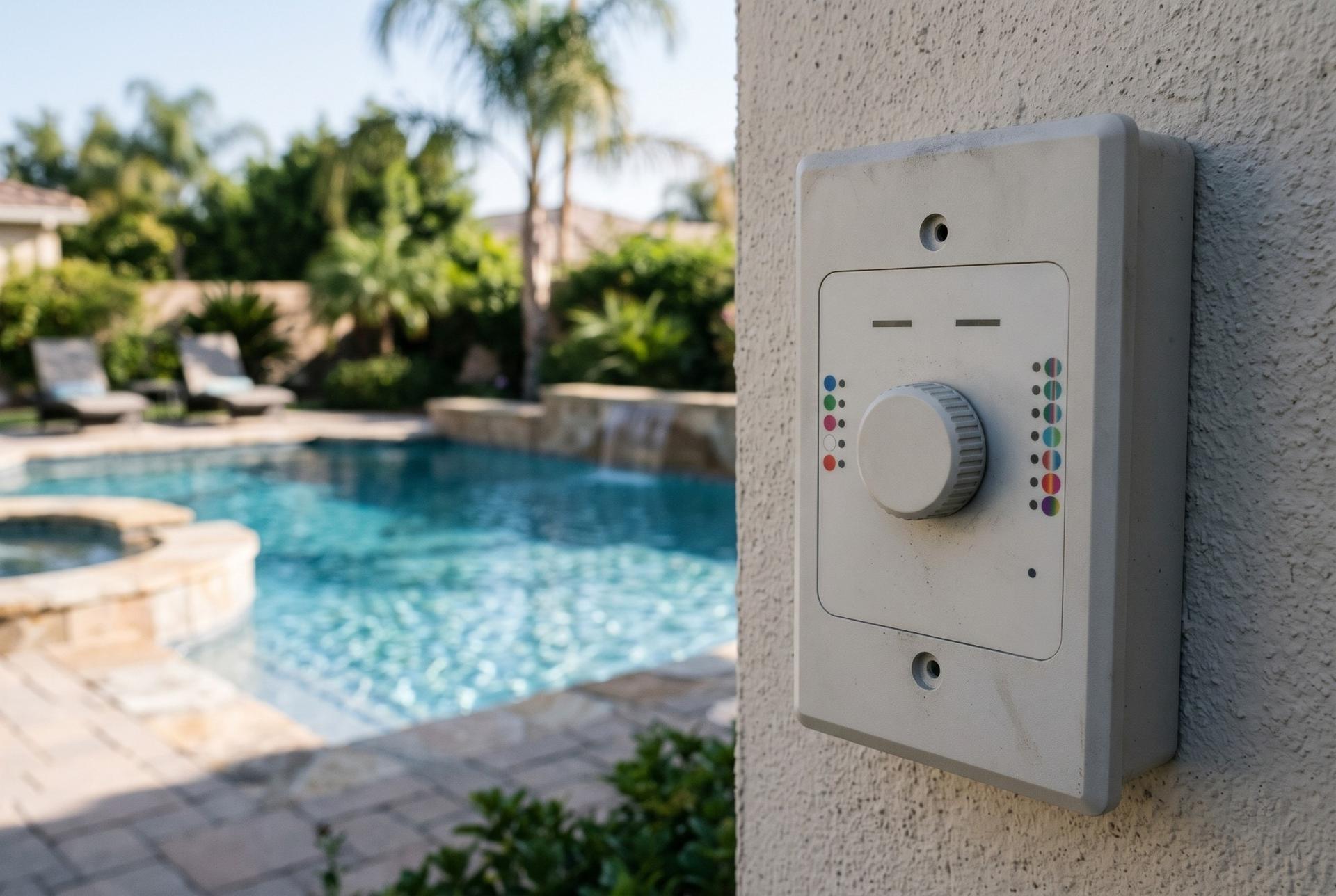
The Color Sync is Pentair's controller for its color LED lights on a pool with no automation system. It goes in a wall box where the light switch would be, switches the lights on and off, and runs them through Pentair's seven shows and five fixed colors. You pick them with the dial on its face or from a phone app, and the app adds schedules and a twilight start. It's a 120-volt device, and 12-volt lights hang off it through a transformer.
A pool with Pentair automation, such as an IntelliCenter, IntelliTouch or EasyTouch, runs these lights from the panel instead. Pool automation covers those systems.
The lights it runs
Pentair's 2025-2026 catalog calls it the controller for its legacy color LED lights, and lists:
- MicroBrite Color
- GloBrite Color
- IntelliBrite 5G Color
- IntelliBrite Architectural Series color lights
- the ColorVision LED Bubbler and MagicStream laminars
It doesn't run IntelliVibe. Pentair's newest lights need their own controller. It doesn't run incandescent lights either: the installation guide says it isn't designed for them.
Keep to one model of light. The catalog's note says that for the best results with several lights, use all the same model and don't mix models in one installation. The shows are Pentair's own, so lights from another maker won't follow them.
How many lights
The installation guide sets the load two ways. 300 watts is the absolute limit, and loading above it will cause permanent damage and may leave the controller dead for good. 240 watts, 80 percent of that, is the recommended maximum for continuous use, and Pentair's table counts lights against it:
- MicroBrite Color: 14 W a light, 17 lights
- IntelliBrite 5G Color: 26 W a light, 9 lights
- GloBrite Color: 15 W a light, 16 lights
The table counts a MicroBrite at 14 watts. Its own manual gives 12 watts at most, which would allow 20. Plan on the table's 17, which is the safer number.
With 12-volt lights, the transformer has a limit of its own. Pentair's IntelliBrite 5G guide allows three pool lights and one spa light on one 300 W transformer. Check the light's page before you count only against the controller.
Overloaded or overheated, the controller won't turn the lights on, and all its indicator lights flash. Switch it off at the breaker, find the fault or cut the load, and switch it back on to reset it.
Wiring it in
The box comes first. The controller mounts in a standard outlet box that's bought separately. It has to be listed for wet locations, hold at least 22.5 cubic inches and have at least one 3/4-inch conduit inlet. It goes at least 5 feet horizontally from the pool's inside wall, with its top at least 1 foot above the maximum water level, on a flat vertical surface indoors, outdoors or in an equipment shed. Conduit runs from the light niche to the box.
Check the WiFi there before you mount it. The controller works only on 2.4 GHz. Dual-band routers are fine, as long as the 2.4 GHz band reaches the spot.
The back has three screw terminals:
- LINE, black: the incoming hot from the GFCI.
- NEUTRAL, white: joined to the white wire from the light or transformer and the incoming neutral.
- LOAD, red: to the light's hot wire for a 120-volt light. For 12-volt lights it goes to the transformer's 120-volt side, and the lights go on its 12-volt side. Never wire a 12-volt light straight to the controller.
The green ground wires from the light and the GFCI go to the ground screw in the box. Wire is 12 AWG at most, copper only. Don't connect two controllers together.
Fit the gasket before the wires. It goes on the back of the controller. Grease the two front screws' threads with the grease supplied, so they don't tear it, and screw the controller into the box.
Connecting the app
The 2021 guides use the Pentair Home app, and so does the printing on the controller's face in Pentair's photo. The product page, the 2025-2026 catalog and Pentair's app FAQ use the Pentair Pool app. Pentair's IntelliConnect went through the same change.
The guides' steps:
- Make an account in the app and set up your profile.
- Tap Add a Device, then Color Sync, and turn on your phone's Bluetooth.
- On the controller, press and hold the dial for 10 seconds, until the WiFi light is solid blue and the other lights are solid white.
- Pair over Bluetooth, then pick your home network and enter its password.
- Pick the address and give the controller a name.
A solid green WiFi light means it's on your network.
If the signal is weak, move the router or the controller closer, or add a 2.4 GHz range extender. Then connect the controller to the extender's network, whose name often ends in EXT. The user's guide says anything weaker than minus 75 dBm at the equipment pad needs fixing.
Using it
At the controller: press and hold the dial briefly to switch the lights on. Turn it to a color or show, and its light blinks. Press once to select it, and the light goes solid. To switch off, press and hold until all its lights go out.
The five fixed colors are blue, green, magenta, white and red. The seven shows:
- SAm: white, magenta, blue and green, imitating Pentair's SAm light.
- Party: rapid color changes.
- Romance: slow transitions.
- Caribbean: blues and greens.
- American: red, white and blue.
- Sunset: orange, red and magenta.
- Royal: richer, deeper tones.
Hold and Recall keep a color you like from a show. During a show, select Hold. The lights go off for a moment and come back on in the color that was showing. Recall brings back the last color you held. Either works from the dial or the app, and the app shows whatever was set at the controller.
In the app, there are two schedules, Monday to Friday and the weekend, each with a start time and a run length. For a twilight start, set the run length first, then turn on Twilight. Pentair's app FAQ says it uses the phone's location, so the start moves with the seasons. There's also a one-time countdown timer up to 23 hours 59 minutes, a Low or High setting for the brightness of the controller's own lights, and alerts by push, email or text when it overloads.
When the lights won't come on
Both guides carry the same troubleshooting:
- No lights at all: check the wiring, and check for 120 volts on the incoming black and white and on the red output. If the controller shows a color or show lit, the voltages are right and it isn't in overload, Pentair says to replace it.
- Some lights out: disconnect the lights and reconnect them one at a time, to find a bad light. If the lights are fine, check the transformer is on the right tap, 12, 13 or 14 volts, for the load and the cable length. If it still won't work, replace the controller.
- No lights, every indicator flashing: overload or overheating. Turn it off at the breaker, check everything on it, including the transformer, and bring the load under the limit.
- Lights out of step with each other: pick a fixed color to check. Hold the dial until the controller resets, and try again. If they still won't stay in sync, Pentair says to replace the controller.
- The app can't reach it: check its WiFi light is green, the router is on, and the router has a 2.4 GHz band.
Pool light not working covers the light, the GFCI and the transformer, and how each maker's color lights fall out of step.
Where you buy it
The 618031 is on Pentair's TradeGrade list, sold through pool stores, builders and service companies, and its product page says it's available through dealers. Amazon lists it too. The warranty is one year on Pentair's own row for it, and bought online it's parts only. The outlet box isn't included.
Where Pentair's documents disagree
- The load. The installation guide and the product page give 300 watts as the limit. The user's guide says the overload alert comes when the lights' total passes 240 watts, the installation guide's recommended maximum.
- The MicroBrite's wattage. 14 watts in the Color Sync table, 12 in the MicroBrite's own manual.
- The app. Pentair Home in the 2021 guides, Pentair Pool on the current product page, the catalog and the app FAQ.
- The timer and a schedule. One page of the user's guide says a running timer overrides a schedule. Two later pages say a schedule that overlaps the timer pauses it, and the timer finishes when the schedule ends.
- The lights it runs. The catalog lists the IntelliBrite Architectural Series. The 2021 brochure doesn't, and adds Pentair's MagicBowl water effects.
- The installation guide's number. One page of the user's guide calls it 691791. Everywhere else, including the guide itself, it's 618034.
Which model do you have?
The model number is on the light controller label. Everything else in the range is shared — these are the parts that change with it.
| Model | SKU | Lights | Load |
|---|---|---|---|
| Color Sync controller | 618031 | Pentair color LED, 120 or 12 V | 240 W continuous, 300 W at most |
Note on Color Sync controller: The only number. It's on Pentair's TradeGrade list, so it's sold through dealers. The outlet box it mounts in is bought separately. | |||
Pentair Color Sync Controller warranty
1 year parts, Included when bought from a store, builder or service company and professionally installed labor
One year. Pentair's warranty table gives the Color Sync controller its own row at one year, the same as GloBrite and against two for MicroBrite, the IntelliBrite Architectural Series and IntelliVibe. The 618031 is on Pentair's TradeGrade list, revised October 23, 2026, sold through stores, builders and service companies. Bought online, even from an authorized online reseller, Pentair's warranty page gives one year, parts only. Lighting also counts toward Pentair's three-year bundle warranty: a pump, a filter and at least one more eligible product, bought on one invoice from a store, builder or service company, installed at the same home and registered with the bill of sale.
Manufacturer’s termsBuy the light controller
Pentair Color Sync Controller parts, and what goes wrong
Read off the manufacturer’s parts list and checked before it ships. Open a row for what a bad one actually does — or start from the symptom and work down, which is the cheaper order.
What is it doing?
Pentair publishes no parts inside it, and its troubleshooting ends at replacing the whole controller in three cases. No lights come on, though the controller shows a color or show lit, reads 120 volts on its input and its red output wire, and isn't in overload. Some lights stay out after each light has been checked and the transformer's 12, 13 or 14 volt tap suits the load and cable. Or the lights still won't stay in sync after you hold the dial until the controller resets.
The controller is rated for outdoors only with its gasket and a wet-location box. To fit a new gasket, switch off the breaker, take out the two front screws and lift the controller out. Unscrew its three wires from the terminal block low on its back, and peel the old gasket off. Fit the new one flush against the back of the face plate, put the wires back as they were, grease the two screws' threads so they don't tear it, and screw the controller back in. The number is from the installation guide. The catalog's lighting parts pages don't list it.
A 12-volt light can't be wired straight to the controller, which switches 120 volts. The controller's red LOAD wire goes to the transformer's 120-volt side and the lights to its 12-volt side. Pentair's 100 W pool light transformer is 619962. The MicroBrite and GloBrite pages have how many of each light it carries.
The installation guide's wiring drawing shows a 300 W transformer, and 619963 is Pentair's. With 12-volt lights, the transformer's limit applies as well as the controller's: Pentair's IntelliBrite 5G guide allows three pool lights and one spa light on one 300 W transformer, with no more than 100 feet of cable in total. The IntelliBrite page has the rest.
Pentair Color Sync Controller manuals and documentation
Hosted by the manufacturer. These open on Pentair’s own servers, so they stay current.
- Color Sync controller installation guide (P/N 618034 Rev. B, 8/2021)manual
- Pentair Home Color Sync controller user's guide (P/N 618033 Rev. A, 2021)manual
- Color Sync controller quick start guide (P/N 618032 Rev. A, 2/2021)manual
- Color Sync controller product page: 618031, dealer onlyspec
- Color Sync controller brochure (P1-602, 03/21)spec
- Pentair Pool 2025-2026 product catalog, lighting: the Color Sync controller on page 156spec
- Pentair Pool and Pro app FAQs: the lights the Color Sync controller runs, and twilight modespec
- MicroBrite color and white light installation and user's guide (P/N 523371 Rev. F, 1/2021), for its own wattagemanual
- Pentair TradeGrade SKU list (revised October 23, 2026)spec
- Pentair pool and spa equipment warranty informationspec
Pentair Color Sync Controller complete parts list
Every part number the manufacturer lists for this equipment, from its own documents. Marked rows are the ones covered above with a symptom and a diagnosis.
| Part | Description | Note |
|---|---|---|
| 618031 | Color Sync controller what goes wrong Amazon listing for 618031 | Pentair's product page. Dealer only |
| 602159Z | Mounting kit: gasket, two screws and a grease packet what goes wrong | From the installation guide |
| 619962 | Transformer, 100 W, 120 V in, 12 to 14 V out what goes wrong Amazon listing for 619962 | For 12 V lights. From the MicroBrite and GloBrite manuals |
| 619963 | Transformer, 300 W, 120 V in, 12 to 14 V out what goes wrong | For 12 V lights. The installation guide's wiring drawing shows a 300 W transformer |