Hayward · AquaRite
Hayward AquaRite S3 and S3 Omni
Hayward's salt system with pump and heater control built in: the five models, the salt range its manuals can't agree on, and what each cell message means.
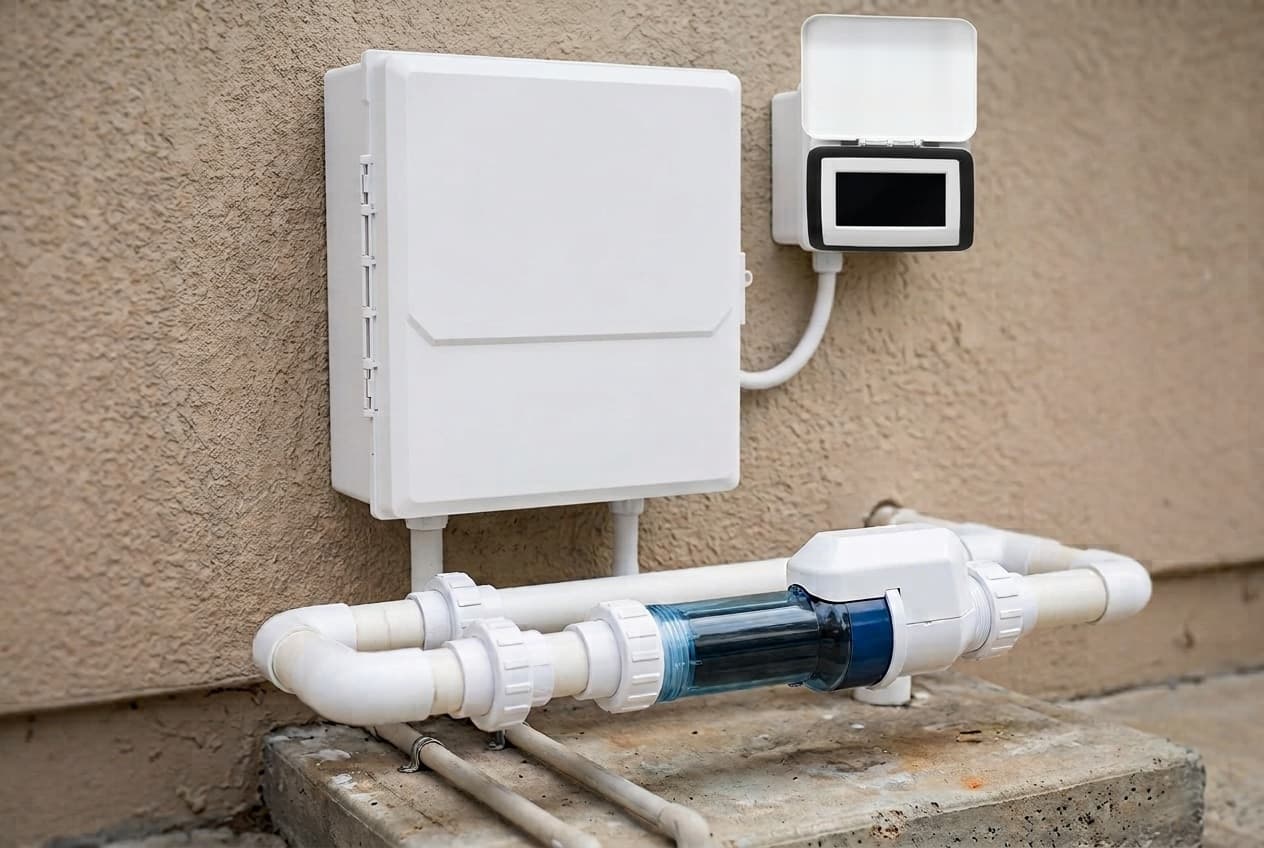
The AquaRite S3 is Hayward's salt system with pool control built in. Besides making chlorine, it runs a variable-speed pump on up to three schedules a day, controls a heater, and turns chlorine down when an automatic cover closes.
It comes in three sizes, for 15,000, 25,000 and 40,000 gallons. The S3 Omni, in the 25 and 40 sizes, adds a separate Omni controller, relays for lights and other equipment, valve actuator outputs, and the OmniLogic app. A base S3 can be converted later with the AQRS3OMNIKIT.
The cell is the TurboCell S3, with a clear body so you can see scale and the bubbles of chlorine being made. The S3 won't run any other cell, and the older T-CELL range on the TurboCell page doesn't fit it. The Omni models run on the same OmniLogic app as Hayward's OmniLogic automation.
Which one
Pick the size by your pool's gallons. The manual gives each cell's output at 100%:
- AQRS315: 0.53 lb of chlorine a day, for pools to 15,000 gallons
- AQRS325 and AQRS325OMNI: 0.98 lb a day, to 25,000 gallons
- AQRS340 and AQRS340OMNI: 1.47 lb a day, to 40,000 gallons, or 25,000 on a commercial pool
The base S3 controls one pump, one heater and a cover switch from its own six-button display. It runs a Hayward variable-speed pump directly, a Pentair variable-speed pump through the HLPMPCONV converter, or a single-speed pump through an HLH485RELAY Smart Relay. Temperature sensors are sold separately, and it needs them for heater control and freeze protection. It can also run as a chlorinator only, taking its orders from a Hayward Omni control.
The S3 Omni adds two built-in high-voltage relays (three with a Smart Relay), two valve actuator outputs, control of up to two heaters, Wi-Fi and Ethernet, and inputs for pH and ORP sensors. Air and water sensors come in the box.
Converting a base S3 to Omni is a kit, not a new system. It adds the controller, an expansion board, the sensors and the relays. Hayward warns that every setting and schedule is lost in the upgrade, so write them down first. The controller mounts no more than 15 feet from the S3.
Installing it
- Mounting: vertical, knockouts down, at least 6 feet horizontally from the pool. The enclosure is vented, so don't block its sides or put it inside a panel. The cell, flow switch and sensor cables are all 15 feet.
- Plumbing: the cell and flow switch go in the return line, after all other equipment, in 2 inch PVC. The flow switch needs 12 inches of straight pipe before it, and its arrow has to point with the flow. On a pool and spa with spillover, the manual shows two layouts that chlorinate both during spillover without overdosing the spa on its own, and one layout never to use. Tighten the cell unions by hand.
- Power: 115 V at 2 A or 230 V at 1 A, which it detects on its own. If it controls the pump, it needs constant power. If not, wire it to the load side of the pump timer. In Canada, it goes on a Class A GFCI circuit.
- Last: plug the cell in after the front panel is back on.
The manual lists the variable-speed pumps that wire straight in as the TriStar VS 950 and 900, Super Pump VS 700 and MaxFlo VS 500. On a pump with dip switches, set them all off and disconnect the pump's own display. The TriStar VS page covers that pump.
For a heater, the S3 closes a low-voltage 2-wire remote contact. It doesn't switch the heater's power. The manual says the heater's own switch will very likely need to be on and its thermostat at maximum, and to use 105°C wire where the heater's manual gives no rating.
Salt
The base S3 manual says it makes chlorine from 1,200 to 8,000 ppm, with 3,200 optimal. Below that it keeps running in an alarm state down to 800 ppm, then shuts off. Its water chemistry table asks for 2,700 to 3,400 ppm, which the manual says stays below the level most people can taste. The low and high salt warnings default to 2,700 and 3,400.
The S3 Omni manuals give two modes instead. Standard Salt runs at 2,700 to 3,400 ppm, 3,200 optimal. Low Salt runs at 1,200 to 1,800 ppm, 1,500 optimal. You choose one when you set up the cell.
Use salt that's at least 99% sodium chloride: pool salt, food-grade salt or water softener salt. No rock salt, iodized salt, or salt with anti-caking additives. On new plaster, wait 10 to 14 days. Broadcast it with the pump on, brush it around, and run the pump for 24 hours. The salt reading can take that long to catch up.
For scale, Hayward's chart puts 267 lb of salt into 10,000 gallons of water with no salt in it to reach 3,200 ppm. The manual also says to check stabilizer whenever you check salt, since both drop with dilution, and gives a chart to bring it to 40 ppm. Hayward discourages dry acid for pH, because its by-products can build up and damage the cell. Saltwater pool maintenance covers the routine around it.
Setting the output
Chlorine output is a percentage from 0 to 100%, set with the + and − buttons on the home screen. It only makes chlorine while the pump runs, so longer run times need a lower setting and shorter ones a higher setting. Expect to raise it for hot weather, heavy use or an aging cell.
The water temperature at the cell decides whether it runs at all:
- 60°F to 140°F: your setting
- 50°F to 59°F: 20%, or your setting if that's lower
- Below 50°F or above 140°F: off
A heater upstream warms the water at the cell, so the display can read lower than the cell sees.
Super chlorinate runs the cell at maximum for the hours you choose. If the S3 controls the pump, it turns the pump on and overrides the schedule. If not, run the pump yourself the whole time. Turning the pump off, or turning the S3 off, ends it.
Cover detection needs a normally open switch from the cover. When the cover closes, output is capped at a setting you choose, and the pump can run at its own speed.
What the messages mean
From Hayward's technical training guide:
- Inspect Cell: comes up every 500 hours. Inspect the cell, then press OK to dismiss it.
- Cell Exhausted: the cell is past its service life.
- Cell Missing: the cable is unplugged, or the cable or connector is damaged.
- Invalid Cell: the cell isn't compatible, or it's defective. Try a known S3 cell or cable to tell a bad cell from a bad board.
- Output won't go above 20%: the water at the cell is cold.
- Output won't turn on: the chlorinator is disabled, flow is too low, the pump isn't running, the flow switch is unplugged or faulty, or the water at the cell is out of range.
- Time and date keep resetting: the guide blames the coin cell battery.
In freeze protection, super chlorinate pauses, and changing settings by hand means turning freeze protection off first.
Cleaning the cell
Turn the S3 off and take the cell out. Look for light, crusty scale on the plates. If there's none, put it back. If there is, try a high-pressure garden hose, then a plastic or wooden scraper. Never use metal, which scratches the coating off the plates.
For scale that won't come off, mix 4 parts water to 1 part muriatic acid: a gallon of water to a quart of acid, adding the acid to the water. Wear gloves and eye protection. The manual stands the cell in the solution with the wiring compartment above it, soaks it a few minutes and rinses it. The training guide pours the solution into the cell on Hayward's GLX-CELLSTAND instead. Repeat if scale remains.
Hayward's guide says cells kept at pH 7.2 to 7.8 with moderate calcium usually need cleaning three or four times a year. The Omni manual says to open and inspect the cell every 3 months or after cleaning the filter. Scale that keeps coming back points at the water, and the saturation index is where to look. If output stays low after a clean, a salt cell that won't make chlorine goes through the rest.
Winter and firmware
The cell and flow switch freeze like the rest of the plumbing, so drain them with the pump, filter and lines before a hard freeze. The manual says the control box can stay on the wall.
Firmware comes from the AquaRite S3 product page on Hayward's site. There are two files, for the display and the main board, and each is updated separately. The USB drive has to be FAT32, with the files in its root folder. The guide adds that some drives won't work, and that the system can take many seconds to find the drive, so don't rush the menus.
Buying one
All five are Expert Line systems sold through pool professionals, with three years parts and one year labor on Hayward's product pages. Hayward's brochure says they're only from pool pros, and its 2026 price schedule lists no online version.
An Amazon listing for the AQRS325 was selling at $2,199.95 from a third-party seller when checked, with a title claiming both 25,000 and 40,000 gallons. Hayward says its warranty applies only to products bought from Hayward or its authorized sellers, and that it can reject claims for products from unauthorized internet sites. For an Expert Line system, that's a real risk, so this page has no store link. How salt systems work covers the choice between brands.
Where Hayward's documents disagree
- Chlorine output. Hayward's product pages list 1.45 lb a day on all five systems and on the 15, 25 and 40 gallon S3 cells. The manuals give 0.53, 0.98 and 1.47 lb by cell. The 18,000 gallon cell's page says 0.6; the manuals say 0.73. The AquaTrol's pages give 0.75 for the system that cell fits.
- The salt range. The base manual says 1,200 to 8,000 ppm, alarming down to 800. The Omni manuals say 2,700 to 3,400, or 1,200 to 1,800 in Low Salt mode. The family brochure gives the S3 800 to 8,000 ppm, with reduced output below 2,700, and Hayward's sanitization brochure says the S3 Omni runs as low as 800.
- Cold and hot water. The manual limits output to 20% from 50°F to 59°F and shuts it off above 140°F. The training guide caps it at 20% at 60°F or below and shuts it off above 120°F. The Omni operation manual agrees with 50°F and 140°F.
- The flow switch. The manual lists it in the box. The training guide calls it sold separately.
- The battery. The manual says the coin cell battery is non-replaceable and not to attempt replacing it. The training guide's fix for a clock that won't keep time is to replace it.
- A part number. The manual lists the 25 ft flow switch as GLX-FLOW-RP-25. Hayward's site sells GLX-FLO-RP-25.
- Warranty. The product pages say three years parts and one year labor. The manual's warranty, still dated 2012, says three years and excludes labor. The family brochure advertises three or more years parts and labor from a Totally Hayward partner.
- The wrong quick guide. The 25,000 gallon product page links a quick reference guide for the older AquaRite, with a toggle switch, T-CELL sizes and a 2,400 ppm cutoff that don't apply to the S3.
Which model do you have?
The model number is on the salt cell label. Everything else in the range is shared — these are the parts that change with it.
| Model | SKU | Pool size | Cell | Chlorine, per the manual | Cell current at 100% | Control | Note |
|---|---|---|---|---|---|---|---|
| AquaRite S3, 15,000 gallons | AQRS315 | Up to 15,000 gallons | TCELLS315 | 0.53 lb a day | 3 A | On-unit display | The base control with the TurboCell S3 15. Hayward lists no Omni version at this size. |
| AquaRite S3, 25,000 gallons | AQRS325 | Up to 25,000 gallons | TCELLS325 | 0.98 lb a day | 5 A | On-unit display | The base control with the TurboCell S3 25. |
| AquaRite S3, 40,000 gallons | AQRS340 | Up to 40,000 gallons | TCELLS340 | 1.47 lb a day | 6 A | On-unit display | The base control with the TurboCell S3 40. The manual rates it to 40,000 gallons on a residential pool or 25,000 on a commercial one. |
| AquaRite S3 Omni, 25,000 gallons | AQRS325OMNI | Up to 25,000 gallons | TCELLS325 | 0.98 lb a day | 5 A | Omni controller and OmniLogic app | Adds the Omni controller, two high-voltage relays, two valve actuator outputs, Wi-Fi and Ethernet, and air and water temperature sensors in the box. |
| AquaRite S3 Omni, 40,000 gallons | AQRS340OMNI | Up to 40,000 gallons | TCELLS340 | 1.47 lb a day | 6 A | Omni controller and OmniLogic app | The Omni version of the 40. |
Hayward AquaRite S3 and S3 Omni parts, and what goes wrong
Read off the manufacturer’s parts list and checked before it ships. Open a row for what a bad one actually does — or start from the symptom and work down, which is the cheaper order.
What is it doing?
The S3 runs only on a genuine TurboCell S3, and Hayward's training guide says the board supports nothing else. The other sizes are TCELLS315, TCELLS325 and TCELLS340X25, the 40 on a 25 ft cord. Cell Exhausted means the cell is past its service life. Invalid Cell means the cell isn't compatible or is defective; Hayward suggests swapping in a known S3 cell or cable to tell a bad cell from a bad board. After fitting one, reset it from Service settings. A cell bought on its own carries three years parts only.
Live pricing arrives when the retailer programs are approved.
No flow means no chlorine. Hayward's troubleshooting lists a disconnected or defective flow switch among the reasons output won't start, along with the pump not running. The switch needs 12 in. of straight pipe before it, or the cell counts if the switch sits after it, and the arrow on its gray hex has to point with the flow. The tee is GLX-FLO-T. The 25 ft version is GLX-FLO-RP-25 on Hayward's site.
Live pricing arrives when the retailer programs are approved.
Hayward's check, after confirming the board has power: unplug the cable from the display and measure between the red and black wires. If there's 5 V DC, the display is bad. If not, check for 5 V between pins 1 and 5 on the J18 display socket. Voltage there means the cable is bad; none means the main board.
Live pricing arrives when the retailer programs are approved.
A working board blinks its LED three seconds on and three off. If it doesn't, Hayward's training guide checks the supply at the pigtail connector first, then the high-voltage power connector, where no power means a new board. Next is the glass fuse FUS3: if it's open, unplug the transformer at J14 before replacing it. If the surface-mount fuse FUS1 is open, the board has to be replaced, and so does a board with power and good fuses that still won't blink.
Live pricing arrives when the retailer programs are approved.
The end of both of Hayward's power trees. The Omni board is a different part, GLXS3OMNIPCB.
Live pricing arrives when the retailer programs are approved.
A 10K thermistor. The base S3 needs a water sensor to run a heater and an air sensor for freeze protection, and neither comes in its box; the Omni includes both. Hayward's troubleshooting notes that a faulty air sensor can trigger freeze protection. The water sensor goes in a 3/8 in. hole after the filter and before any heater, sealed by its o-ring under a hose clamp that shouldn't be overtightened.
Live pricing arrives when the retailer programs are approved.
Holds the cell upright for an acid clean, so the solution can be poured in to the top of the plates. Hayward's training guide recommends it.
Live pricing arrives when the retailer programs are approved.
If you are doing the job anyway
These get replaced together. Doing them in one pass costs a few dollars more and saves taking the same thing apart twice.
Blank display
Hayward's troubleshooting checks the fuses before the display, and the display before the main board. The fuse set is the cheap part to have on hand while you work down the list.
- Fuse setGLXS3FUSE
- Display with display cableGLXS3DISPLAY
Hayward AquaRite S3 and S3 Omni manuals and documentation
Hosted by the manufacturer. These open on Hayward’s own servers, so they stay current.
- AquaRite S3 owner's manual (1011728 Rev B)manual
- AQR S3 Omni installation manual (1011734 Rev B)manual
- AQR S3 Omni operation manual (1011736 Rev B)manual
- AQR S3 Omni upgrade kit owner's manual (M092768 Rev B)manual
- AQR S3 Omni upgrade kit quick start guide (M092778 Rev A)guide
- AquaRite S3 technical training guide, with troubleshooting and the salt chart (TSG-AQRS3a)guide
- AquaRite S3 sell sheet, with the model and cell numbers (eLITAQRS322)spec
- AquaRite family brochure, with the comparison table (LITAQRBRO23)spec
- Sanitization alternatives brochurespec
- AquaRite S3 40,000 gallon product pagespec
- AquaRite S3 Omni 40,000 gallon product pagespec
- 2026 Expert Line warranty termsguide
Hayward AquaRite S3 and S3 Omni warranty
3 years parts, 1 year labor
Hayward's product pages give all five systems three years parts and one year labor, in the Expert Line sold through pool professionals. Hayward's 2026 Expert Line terms cover a salt cell bought on its own for three years parts only, the 'W' warranty cells for one year parts only, and control accessories bought on their own for one year parts. The manual's own limited warranty gives three years on a residential pool, one year on a commercial one, and one year on accessories and replacement parts, including temperature sensors and flow switches. It isn't transferable, and a non-genuine Hayward cell voids it. Hayward's terms say the warranty applies only to products bought from Hayward or its authorized sellers, and that it can reject claims for products from unauthorized internet sites.
Manufacturer’s termsHayward AquaRite S3 and S3 Omni complete parts list
Every part number the manufacturer lists for this equipment, from its own documents. Marked rows are the ones covered above with a symptom and a diagnosis.
23 parts
| Part | Description | Note |
|---|---|---|
| GLXS3HANDLE | Handle with coupler link | |
| GLXS3PCB | Main board, AquaRite S3, with cable and hardware what goes wrong | |
| GLXS3OMNIPCB | Main board, AquaRite S3 Omni, with cable and hardware | From the Omni operation manual |
| GLXS3FUSE | Fuse set what goes wrong | |
| GLXS3DISPLAY | Display with display cable what goes wrong | |
| GLXS3RELAY | Relay with cable and hardware | |
| GLXS3PLXFMR | Transformer with hardware | |
| GLX-PC-12-KIT | Temperature sensor with hose clamp what goes wrong | |
| GLX-FLO-RP | Flow switch, no tee, 15 ft cable what goes wrong | |
| GLX-FLO-RP-25 | Flow switch, no tee, 25 ft cable | The manual prints GLX-FLOW-RP-25; this is the number on Hayward's site |
| GLX-CELL-UNION | PVC cell unions, 2 in. slip | |
| GLX-FLO-T | PVC tee for the flow switch, 2 x 2 x 1/2 in. | |
| GLX-CELLSTAND | Cell cleaning stand what goes wrong | |
| GLX-CELL-PIPE | PVC pipe placeholder for the cell | |
| TCELLS315 | TurboCell S3, 15,000 gallons | |
| TCELLS318 | TurboCell S3, 18,000 gallons | Hayward's site lists it for the AquaTrol |
| TCELLS325 | TurboCell S3, 25,000 gallons | |
| TCELLS340 | TurboCell S3, 40,000 gallons what goes wrong | |
| TCELLS340X25 | TurboCell S3, 40,000 gallons, 25 ft cable | |
| AQRS3OMNIKIT | Omni upgrade kit | Controller, expansion board, air and water sensors, high-voltage relays and harnesses |
| HLH485RELAY | Omni RS-485 Smart Relay | For a single-speed pump on the base S3, or a third high-voltage relay on the Omni |
| HLPMPCONV | Converter board for Pentair variable-speed pumps | |
| HLAQRPCB | AquaRite daughter board | Lets an S3 control an older AquaRite as a second chlorinator |