Hayward · AquaRite
Hayward AquaRite 100
Hayward's AquaRite 100 for in-ground pools to 30,000 gallons: its wide salt range, the missing salt readout, what the blinking lights mean, and which cells fit.
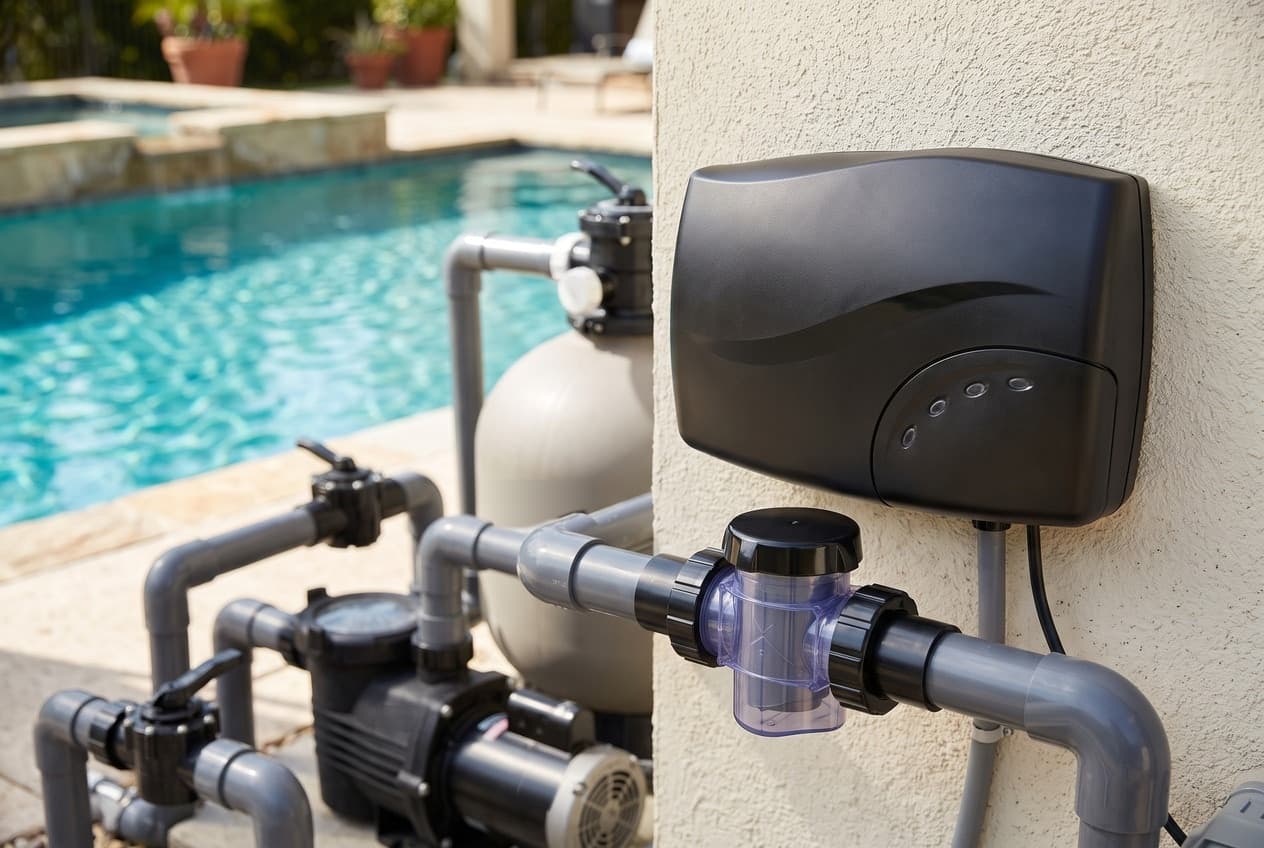
The AquaRite 100, AQR100, is Hayward's salt chlorine generator for in-ground pools up to 30,000 gallons. It's a wall-mounted control box with a flip-down door over its controls, a clear cell vessel that goes in the return line, and a replaceable cell, the CCELL. The manual says it isn't for above-ground pools, or for in-ground pools over 30,000 gallons.
It works differently from Hayward's other salt systems. Compared with the AquaRite 900 and the AquaRite S3, it:
- runs on a much wider salt range
- has no salt readout and no Omni control
- takes its own cell, not a TurboCell
There's no salt number
Hayward's brochure compares its three AquaRite systems, and for the AquaRite 100 it answers "No" to "Provides Salt Measures". The panel shows lights, not numbers. It will tell you salt is low, with PROBLEM DETECTED and a blinking MIN light, but it never tells you what the salt is. Test salt with a kit, strips or a meter before you add any.
The range it accepts is wide: 1,500 to 4,500 ppm, with 3,200 ideal. Lower salt makes less chlorine, so the manual splits it by pool size:
- Up to 15,000 gallons: 1,500 to 2,700 ppm works, and more salt means less run time.
- 15,000 to 30,000 gallons: keep it above 2,800 ppm.
- Most people start to taste salt at about 3,500 to 4,000 ppm, and too much can shut the unit down. The manual's dosing table says to dilute at 3,600 and above.
The manual's table gives the salt needed to reach 3,200 ppm. From zero, a 20,000-gallon pool needs about 533 lb. The salt calculator does the same arithmetic for any size and starting level.
Use sodium chloride that's more than 99% pure: pool salt, coarse solar salt or water softener salt. Don't use rock salt, iodized salt, or salt with anti-caking additives or yellow prussiate of soda. In a new plaster pool, wait 10 to 30 days before adding any. Brush it around with the pump running, then run the pump for 24 hours drawing from the main drain. The only way to lower salt is to drain some water and refill.
The output lights are a timer
The ten DAILY CHLORINE OUTPUT lights don't set a strength. Each light is 6 minutes of chlorine in every hour the pump runs, so five lights means 30 minutes on and 30 minutes standing by. The manual says to start at five, test every few days, and expect two or three adjustments before it settles.
Three things set how much chlorine it makes: the output setting, the salt level and how long the pump runs. The manual wants the whole pool through the filter at least once a day, and its troubleshooting list puts an average pool at about 8 hours of pump time.
Cold water changes the rules. Between 50 and 60°F it cuts itself back to 12 minutes an hour, two lights' worth, whatever the setting. Below 50°F it stops making chlorine. Pressing SUPER CHLORINATE overrides both for a day. In normal weather it boosts output for 24 hours, as long as the pump is on, and a second press cancels it.
What the lights mean
The status lights, as the manual describes them:
- GENERATING CHLORINE: making chlorine now.
- STANDING BY: steady means it's waiting for the pump or resting between cycles, which is normal. Blinking means it has stopped because the water is too hot or below 50°F.
- INADEQUATE WATER FLOW: no flow or low flow, which is also normal while the pump is off. Otherwise, check the pump, clear any blockage, backwash the filter, or turn a variable-speed pump up. If it persists, pull the cell and check the flow switch paddle at its base moves freely both ways.
- CELL LIFE LOW: the cell has reached the end of its life.
When PROBLEM DETECTED is lit, one of the output lights blinks to say why:
- MIN (light 1): low salt, or a scaled cell. Test the salt, and clean the cell if it's crusted.
- Light 2: high salt, over 4,500 ppm, or water over 104°F.
- Light 3: low input power. Check the wiring against the manual's diagrams, and the supply voltage; a brownout can cause it.
- Light 4: a temperature sensor error.
- Lights 5, 6, 7 and 9: an internal error.
- Light 8: no current reaching the cell.
- MAX (light 10): a communication error with the cell. Check the cell cap and its cable.
For every one of them, the manual's first step is the same: switch the AquaRite 100 off for two minutes and back on. Hayward also publishes an interactive guide, the Salt & Swim control panel, where you hover over the lit and blinking lights on a drawing of the panel. Hayward Support sends AquaRite 100 owners to it.
Which cells fit
The replacement cell is the CCELL. It's a cartridge that slides into the clear vessel, with a cap and retaining nut holding it and its cable in place. Hayward Support has answered three questions about alternatives on the product page:
- A cell with a G1-019372 bar code is a CCELL.
- A W3T-CELL TurboCell won't work: "No, you cannot."
- The Salt & Swim cell, W3SAS-CELL, "can". Another owner who fitted one got PROBLEM DETECTED with the super chlorinate light on, and was told to call technical support.
The manual's warranty is void if a cell other than a new, genuine Hayward cell goes in during the warranty. Hayward's Canadian sell sheet rates a cell at about 450 lb of chlorine over its life. At the 1.08 lb a day on Hayward's product page, that's about 417 days at full output. How many seasons it lasts depends on the output setting and the pump hours.
Installing it
- The control box goes on a flat surface, upright, with its cables pointing down, at least 10 ft from the pool and within 15 ft of the cell. The box is its own heat sink, so leave all four sides clear and don't put it inside a panel. The fasteners need to hold 20 lb.
- The cell vessel fits 2 in. pipe, or 1½ in. with an adapter. It goes last on the return line, after the filter, heater and everything else, on about 10 in. of straight pipe, where the cell can be lifted out. The rubber gaskets go on the vessel before the unions are tightened.
- The cell goes in with its O-ring in place and its pins fully covered in the grease supplied.
- Power is 120 or 240 VAC, from the same circuit as the pump, and the AquaRite 100 must switch on and off with it. The 6 ft cord has five colored wires that set the voltage, and they're joined in a UL-listed junction box. If the pump runs on a timer, the AquaRite 100 is wired in parallel with the pump.
- Bonding: 8 AWG solid copper from the lug on the bottom of the box to the pool's bonding loop, or 6 AWG in Canada.
The manual says it should be installed by a qualified professional.
Water chemistry
The manual's targets:
- pH 7.2 to 7.8, total alkalinity 80 to 120 ppm, calcium hardness 200 to 400 ppm.
- Stabilizer 30 to 50 ppm outdoors, none indoors. Its stabilizer table doses to 40.
- Free chlorine 1 to 3 ppm.
- Metals: none. In a pool that isn't freshly filled, it suggests a quart of metal remover and a quart of non-copper algaecide before start-up.
- Saturation index between −0.2 and +0.2. The LSI calculator works it out.
It discourages dry acid (sodium bisulfate), particularly in dry climates where the water is rarely diluted, because its by-products can damage the cell. It also suggests talking to a stone specialist before using it with natural stone coping or decking.
Cleaning the cell
The cell cleans itself electronically, as the TurboCell does, and in balanced water that's usually enough. Hard water or unbalanced chemistry leaves scale, which the manual reads as a sign of high calcium.
- Turn off the pump and the AquaRite 100, unplug the cell cap, unscrew the retaining nut and pull the cell out.
- If there's crusty white scale on the plates, try a garden hose first.
- Then a plastic or wooden tool, never metal, which scratches the coating off the plates.
- Acid is the last resort: 4 parts water to 1 part muriatic acid, one gallon to one quart, acid added to the water. Stand the cell in a small container with the plates covered and the electronics above the liquid. Soak it for a few minutes, then rinse.
Winter and spring
Freezing water damages the cell. Where winters are severe, drain the pump, filter and lines before the first freeze. The control box and the plumbed-in vessel can stay where they are.
In spring, don't switch it on until the water chemistry is back in range.
Replacing the board or the transformer
Hayward publishes separate instructions for the GLXAQR100PCB board and the GLXAQR100XFMR transformer, both "for the AQR100 chlorine generator only". Both jobs start the same way:
- Power off.
- Take the box off the wall and remove the 10 stainless screws in the back with a #2 Phillips.
- Unplug the ribbon cable as the case comes apart.
The board is held by four Phillips screws, after two connectors and a green wire are unplugged. The transformer is held by four hex-head screws (5/16 in.), after a four-wire connector and two yellow wires on the rectifiers.
Hayward's related parts list on the product page mixes in parts for the AquaRite 900, such as the GLX-XFMR transformer and GLX-PCB-RITE board. They aren't the AquaRite 100's parts.
Where Hayward's documents disagree
- Distance from the pool. The manual's safety page says 10 ft (3 meters). Its mounting section says 10 ft (4 meters), and its French safety text says 1 meter. 10 ft is about 3 meters.
- Water temperature. The troubleshooting section says it shuts down above 120°F. Its error table says to check the water is below 104°F, for both a blinking STANDING BY light and a high salt error.
- The salt table. At 600 ppm, the manual gives 609 lb for 30,000 gallons, but 606 for 28,000. The row's pattern and the arithmetic give about 650.
- Mounting template. The manual says the template is on page 18. In the PDF on Hayward's site, page 18 is the warranty and there's no template.
- Minimum flow. The sell sheets give 20 to 25 GPM. The manual gives no figure.
- Warranty. The manual's 2012 terms give the control box three years parts only. The product page and Hayward's 2026 terms add a year of labor. The sell sheet and brochure promise "3+ year parts and labor" from a Totally Hayward partner, and the product page says the same of a Hayward Rewards partner.
Which model do you have?
The model number is on the salt cell label. Everything else in the range is shared — these are the parts that change with it.
| Model | SKU | Note |
|---|---|---|
| AQR100 | AQR100 | The only model: one control box, one cell size, for in-ground pools up to 30,000 gallons. It takes the CCELL, not a TurboCell. |
Hayward AquaRite 100 parts, and what goes wrong
Read off the manufacturer’s parts list and checked before it ships. Open a row for what a bad one actually does — or start from the symptom and work down, which is the cheaper order.
What is it doing?
The AquaRite 100's replacement cell, and the number Hayward Support gives for a cell with a G1-019372 bar code. It isn't a TurboCell: asked whether a W3T-CELL would fit, Hayward Support said no. Asked about the Salt & Swim cell, W3SAS-CELL, it said yes, though another owner who fitted one reported PROBLEM DETECTED with the super chlorinate light on, and was sent to technical support. The flow switch is a small paddle at the bottom of the cell, so a new cell brings a new switch. Hayward's Canadian sell sheet rates the cell at about 450 lb of chlorine over its life. The manual's warranty is void if a cell other than a new, genuine Hayward cell is fitted during the warranty.
Live pricing arrives when the retailer programs are approved.
PROBLEM DETECTED with MAX blinking is a communication error with the cell. The manual's checks are that the cell cap is properly plugged in and that the cable to the control box isn't cut or damaged. The pins should be fully covered with the grease supplied when the cell goes in. PROBLEM DETECTED with output light 8 blinking means no current is reaching the cell, and the manual's checks are the same cable and plates covered by moving water.
Live pricing arrives when the retailer programs are approved.
Those four lights are an internal error. Before suspecting the board, the manual asks for power off for two minutes, salt no higher than 4,500 ppm, water no warmer than 104°F, and cell plates covered by moving water. Then call Hayward. Hayward's instructions say this board is for the AQR100 only. Fitting it means taking the box off the wall, removing the 10 screws in the back and separating the case, so power has to be off first.
Live pricing arrives when the retailer programs are approved.
The AquaRite 100 doesn't measure salt; Hayward's brochure says so in its comparison table. The panel only warns you, with PROBLEM DETECTED and a blinking MIN light, when salt is low or the cell is scaled. Hayward lists this handheld meter among the AQR100's related parts. Salt test strips do the same job.
Live pricing arrives when the retailer programs are approved.
At least one light should be on whenever the AquaRite 100 has power. It's wired to switch on and off with the pump, so check that the pump is running, then the breaker. The manual says a damaged cord has to be replaced by Hayward, its service agent or someone similarly qualified. An owner whose unit hummed with no lights was sent to a Hayward Authorized Service Center.
Live pricing arrives when the retailer programs are approved.
Hayward AquaRite 100 manuals and documentation
Hosted by the manufacturer. These open on Hayward’s own servers, so they stay current.
- AQR100 owner's manual (092735 Rev D); English on pages 1 to 20, French aftermanual
- Replacement PCB for AQR100, GLXAQR100PCB (092004 Rev A)manual
- Replacement transformer for AQR100, GLXAQR100XFMR (092739 Rev A)manual
- Salt & Swim control panel, Hayward's interactive guide to the lights, which Hayward Support sends AquaRite 100 owners tomanual
- AquaRite 100 sell sheet (LITAQR100SS21)spec
- AquaRite 100 sell sheet, Canadian, English and French (LITAQR100SS19C) — the cell's lifetime chlorine ratingspec
- AquaRite family brochure (LITAQRBRO23) — the comparison tablespec
- AQR100 product page, with its related parts and Hayward Support answersspec
- Hayward 2026 Expert Line warranty termsspec
Hayward AquaRite 100 warranty
3 years parts, 1 year labor
Three years parts and one year labor on Hayward's product page, which is also what the 2026 Expert Line terms give in-ground sanitization equipment. A CCELL bought on its own carries three years parts only. The manual's own warranty, dated 2012, gives the control box three years parts only, the cell three years and accessories one. It isn't transferable, and it's void if a cell other than a new, genuine Hayward cell is fitted during the warranty. It excludes pools larger than the rating, water chemistry outside the manual's ranges, freezing, and damage to natural stone around the pool. Hayward's warranty applies only to products bought from Hayward or an authorized seller.
Manufacturer’s termsHayward AquaRite 100 complete parts list
Every part number the manufacturer lists for this equipment, from its own documents. Marked rows are the ones covered above with a symptom and a diagnosis.
| Part | Description | Note |
|---|---|---|
| CCELL | Salt cell what goes wrong | The only cell listed for it |
| GLXAQR100CTL | Replacement controller | Hayward's related parts list |
| GLXAQR100PCB | Replacement main circuit board what goes wrong | For the AQR100 only, per its instructions |
| GLXAQR100XFMR | Replacement transformer | For the AQR100 only, per its instructions |
| GLXAQR100PCORD | Replacement power cord what goes wrong | Hayward's related parts list |
| GLXAQR100CCABLE | Replacement cell cable what goes wrong | Hayward's related parts list |
| GLXAQR100VESSEL | Replacement cell vessel, without cell | Hayward's related parts list |
| GLXAQR100VESNUT | Replacement vessel nut | The retaining nut that holds the cell and cap in the vessel |
| GLXAQR100DOOR | Replacement door | The flip-down door over the controls |
| GLX-SALTMETER | Salt meter, digital, handheld what goes wrong | Hayward's related parts list; the AQR100 has no salt readout |