MOVA · Diver
MOVA Diver A10
MOVA's cordless Diver A10 — what its four-hour runtime really covers, the non-replaceable battery, the parts MOVA sells for it, and a warranty split three ways.
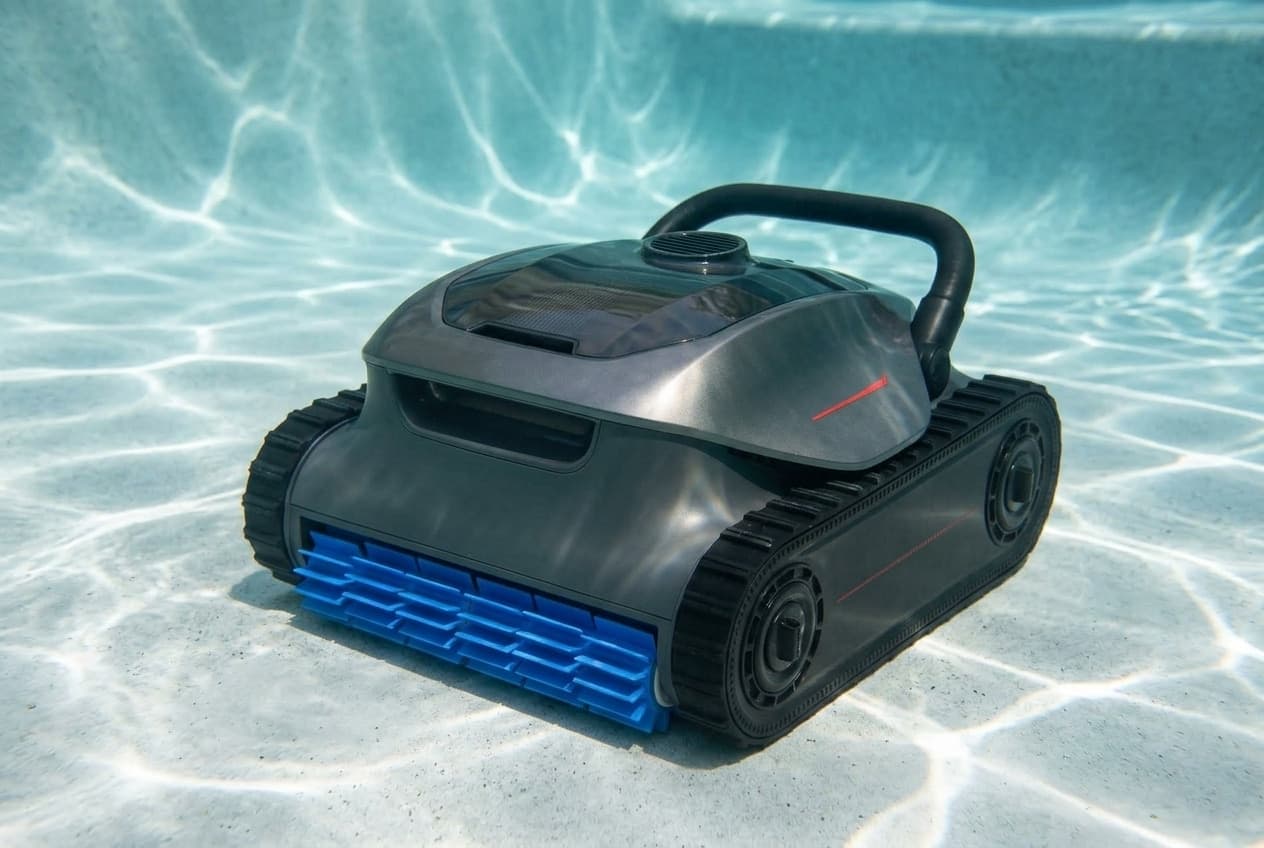
The Diver A10 is MOVA's cordless pool robot: no cable, a 7,800 mAh battery, and a rating for pools up to 1,900 square feet and 3 meters deep. MOVA's US store lists it at $519 against a regular price of $799.
What the runtime covers
MOVA's headline is up to 240 minutes, and its manual is precise about what that means: four hours in Floor Only mode at standard suction. MOVA's product page gives three hours for walls and waterline. A recharge takes five to six hours.
The robot itself offers three modes, chosen with the mode button before it goes in:
- Floor Only: the floor once, until the battery is low. This is the default if you pick nothing.
- Walls Only: the walls twice, until the battery is low.
- Complete: floor and walls until the battery is low.
The MOVAhome app adds more; MOVA's product page counts eight modes. The manual's mode table does not mention the waterline by name, while the product page advertises two passes on the waterline, reaching about 2 inches above it.
The battery is not replaceable
The manual says so directly: the lithium-ion battery cannot be replaced, and it is not to be opened or disassembled. MOVA warrants the battery for one year, against two for the robot, excludes the normal loss of capacity with age, and sells no replacement battery among its Diver A10 parts.
To look after it, charge indoors somewhere cool and dry, never in direct sunlight, which can trip the temperature protection and stop it charging. Store it for winter at 80 to 100% charge, indoors, and charge it fully before the first use of the season.
Setting it up
- Charge fully first. Take the cover off the charging port, dry any water in it, connect the charger, and let it finish.
- Keep the charger at least 11.5 feet from the pool's edge and 4.3 inches off the ground, on a GFCI-protected outlet. No extension cords.
- Turn the pool's circulation and heating off before a cleaning run, and do not use the robot if a liquid flocculant or clarifier has been added.
- Switch it on on a level surface, so its sensors calibrate properly, then choose a mode.
- Close the charging port cover, and lower the robot in at least 8 inches from the wall. Its pump and tracks start only once it reaches the floor, and it calibrates for about five seconds before it begins.
Nobody should be in the pool while it runs.
Connecting the app
MOVAhome needs a 2.4 GHz Wi-Fi network, or a dual-band 2.4/5 GHz one, with Bluetooth on and the phone within about a meter of the robot. Put the robot into Bluetooth pairing, which the manual does by holding a button on the robot for three seconds until the light blinks blue, then add it in the app by QR code or by hand. The robot cannot connect underwater, so cleaning data syncs once it is back out.
Getting it out
When the cycle ends, the battery drops to 10%, or an error occurs, the robot climbs to the waterline and waits there for five minutes. Lift it by the handle and it pushes out its water as it comes up. Leave it longer and it returns to the floor near the wall and shuts down, and then you need the retrieval hook on a pool pole. Auto-parking can be switched off in the app.
Cleaning and maintenance
After every use:
- Rinse the filter basket, and clean the ultra-fine filter. The basket comes out with the filter button; empty it, separate the ultra-fine filter, and hose both.
- Clear the water outlet and roller brushes of hair and debris.
- Wipe the charging port and the sensors dry.
The ultra-fine filter is a consumable to replace regularly, and MOVA recommends checking the tracks and roller brushes and replacing them as needed.
When it is not cleaning properly
- Will not climb, or will not stay on the wall: a clogged filter basket, or a wall whose curve is too steep for it, which MOVA says it is not designed for.
- Moving slowly, or not at all: clean the sensors and the roller brushes, then rock the track wheels back and forth to clear the drive gears.
- Will not follow the floor's edge: clean the sensors, restart it on level ground and let it calibrate.
- Poor results: empty the basket, pressure-wash its compartment, raise the suction setting, or fit the fine filter.
- Blinking red light: restart it on a flat surface, wait 30 seconds before putting it back in, and update the firmware.
- Will not charge: dry the charging port. If that does not fix it, the charger may be damaged.
Where MOVA's documents disagree, or are unclear
- Dimensions. The product page gives 16.7 × 15.2 × 9.2 inches. The manual's specification table gives 388.6 × 221.0 × 444.5 mm, roughly 15.3 × 8.7 × 17.5 inches.
- Charging temperature. The manual's safety section says to charge between 41°F and 113°F; its specification table gives 41°F to 127.4°F.
- Motors. The product page describes three brushless motors; its specification table lists a single pump motor.
- Chlorine. The manual's water table prints chlorine as 10 to 12 ppm, with no note on whether that is a limit or a range. Its other limits are pH 7.0 to 7.8, 41°F to 113°F and salt up to 5,500 ppm.
What the warranty covers, part by part
- Robot and motor: two years.
- Battery: one year.
- Filters, brushes and filter canisters: ninety days, for defects.
- Tracks and scrubbing brushes: excluded, unless they arrive defective.
It applies only in the United States, to the original buyer, and only if the robot came from MOVA's own US channels or an authorized MOVA reseller. The Amazon listing is sold by MOVA's store.
Which model do you have?
The model number is on the cleaner label. Everything else in the range is shared — these are the parts that change with it.
| Model | SKU | Note |
|---|---|---|
| Diver A10 | PIXZ5111 | The model number in MOVA's user manual. MOVA's US store lists it at $519 against a regular price of $799. In the box: the robot, charger, retrieval hook, a fine filter, and the ultra-fine filter already fitted. |
MOVA Diver A10 parts, and what goes wrong
Read off the manufacturer’s parts list and checked before it ships. Open a row for what a bad one actually does — or start from the symptom and work down, which is the cheaper order.
What is it doing?
A full or clogged filter basket is on the manual's list for all three. Press the filter basket button, lift the basket out, open its top cover, empty it, separate the ultra-fine filter, and hose both. MOVA recommends rinsing the basket after every use, and its warranty treats filter canisters as consumables covered for defects for ninety days.
Live pricing arrives when the retailer programs are approved.
The filter for fine debris such as sand, dirt and some algae. MOVA says to clean it after every cleaning task and calls it a consumable to replace regularly. When results are poor because the basket's pores are too large for the debris, the manual's answer is to fit the fine filter.
Live pricing arrives when the retailer programs are approved.
The manual says to check the tracks regularly and replace them as needed with official parts: take off the side panel, the guide wheel brackets, the screws and the wheel retainer, then pull the wheels and track off together. Before that, for a robot that will not move, it says to clean the sensors and brushes and rock the track wheels to clear anything caught in the drive gears. MOVA's warranty excludes tracks unless they arrive defective.
Live pricing arrives when the retailer programs are approved.
Clear hair and debris from the roller brushes after every use. To replace one, unfasten its silicone buckles, fit the new brush and fasten them again. MOVA's warranty excludes scrubbing brushes unless they arrive defective.
Live pricing arrives when the retailer programs are approved.
The manual's first cause is water left in the charging port, so dry it before trying again; its second is a damaged charger. Use only the original charger, never an extension cord, and do not charge in direct sun, which can trip the robot's temperature protection. The charger's cord is not user-replaceable.
Live pricing arrives when the retailer programs are approved.
MOVA Diver A10 manuals and documentation
Hosted by the manufacturer. These open on MOVA’s own servers, so they stay current.
MOVA Diver A10 warranty
2 years parts
MOVA's limited warranty, updated 5 August 2026, splits a pool robot three ways: two years on the main unit and motor, one year on the battery pack, and ninety days on consumables such as filters, brushes and filter canisters, which covers defects only. Tracks and scrubbing brushes are excluded unless they arrive defective, and so are freeze damage, improper winter storage, chemical damage to the seals from unbalanced water, and the normal loss of battery capacity with age. It covers the original purchaser in the United States only, and only for a robot bought from MOVA's own US sales channels or an authorized MOVA US reseller or retailer. The warranty period starts on the later of purchase or delivery; without proof of either, MOVA starts it ninety days after the date on the nameplate. The Amazon listing is sold by MOVA's own store and says two years, which is the robot's term, not the battery's.
Manufacturer’s termsMOVA Diver A10 complete parts list
Every part number the manufacturer lists for this equipment, from its own documents. Marked rows are the ones covered above with a symptom and a diagnosis.
| Part | Description | Note |
|---|---|---|
| 20010100002736 | Filter basket, 180 µm what goes wrong | |
| 20010100002729 | Ultra-fine filter, 3 µm what goes wrong | |
| 20010100002732 | Second layer filter, 100 µm | |
| 20010100002731 | Caterpillar tread what goes wrong | |
| 20010100002734 | Roller brush film what goes wrong | |
| 20010100002733 | Charger for Diver A10 what goes wrong | |
| 20010100002735 | Retrieval hook | Listed for the A10 and V10 |
Buy the cleaner
One retailer for now. More get added here as their programs are approved, and this becomes a comparison rather than a link.