Dolphin · Sigma
Dolphin Sigma
Maytronics' Dolphin Sigma — what it adds over the Premier by Maytronics' own spec tables, the app setup, the top-load cartridges, and the documents it lacks.
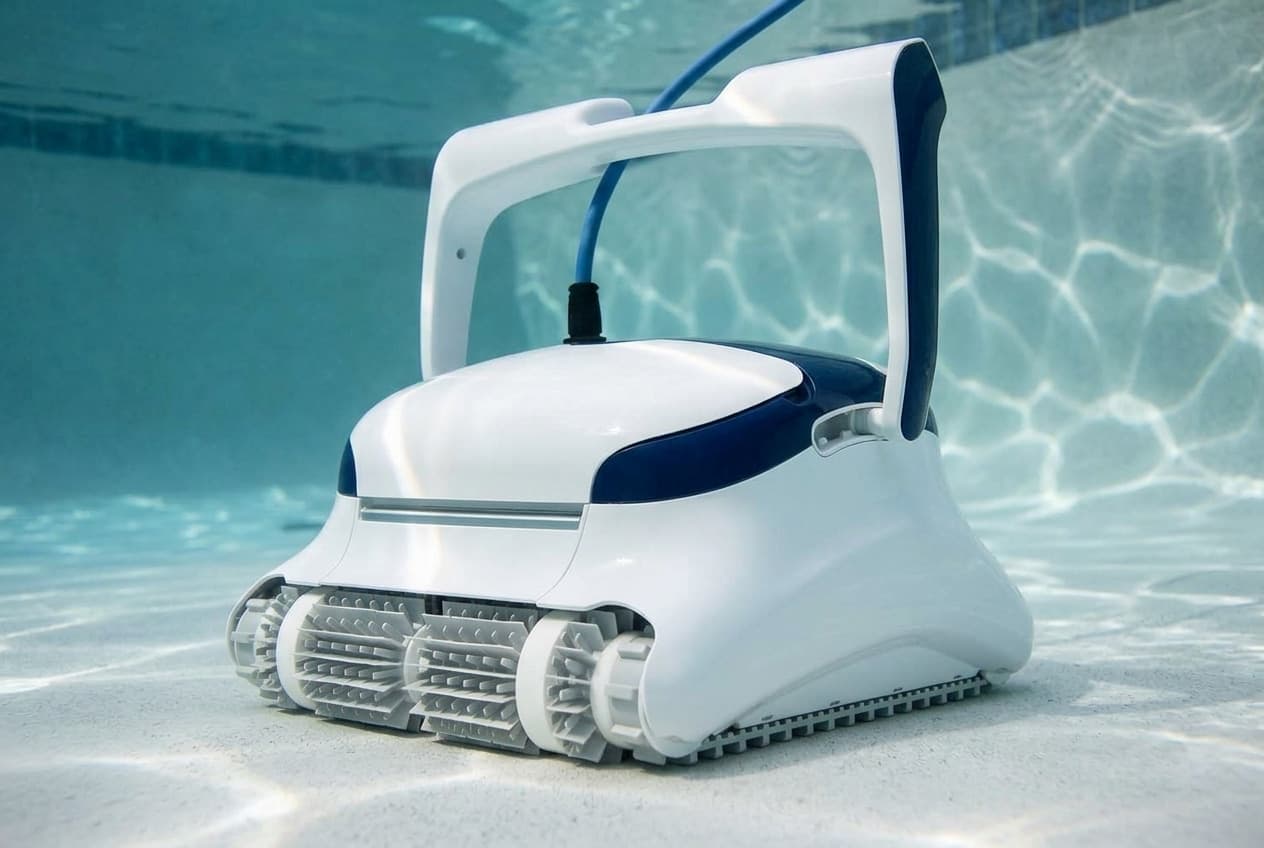
The Dolphin Sigma is Maytronics' corded robot with the MyDolphin Plus app, listed at $2,999 with a three-year warranty. It cleans the floor, walls and waterline of in-ground pools up to 50 feet on a 2.5-hour default cycle, and its filter lifts out of the top.
Sigma or Premier
The two are easy to assume are small and large versions of the same robot. Maytronics' own specification tables say otherwise: they are rated for the same pools and move the same water, and the differences are the app, the filter design and a few smaller specifications.
The same on both:
- Maximum pool length: 50 feet.
- Suction rate: 4,500 gallons per hour.
- Coverage: floor, walls and waterline.
- Brushes: two combined brushes.
- Warranty: three years.
Where they differ:
- App: the Sigma has MyDolphin Plus over Wi-Fi. The Premier has none, and schedules from its power supply.
- Filter: the Sigma's cartridges lift out of the top. The Premier's filter comes out of the bottom, with the robot turned over.
- Full filter indicator: the Premier has one; the Sigma's table says no.
- Default cycle: 2.5 hours on the Sigma, 3 hours on the Premier.
- Weight: 24.6 pounds against 20.3.
- List price: $2,999 against $2,499.
Setting it up
Before the first run, unwind the blue cable and stretch it out completely so it has no kinks, and take the plastic covers off the brushes.
- Lock the handle diagonally. Maytronics says the angle matters for cleaning results, and that it also sets how fast the robot travels along the waterline.
- Place the power supply near the middle of the pool's long side, at least 12 feet from the edge and at least 4 inches off the ground, on an outlet with a ground fault interrupter. Never use an extension cord.
- Soak sponge brushes by dipping and squeezing them the first time, or whenever they have dried out.
- Let the robot sink, check the cable is clear, and put in roughly enough cable to reach the farthest corner. Then switch the power supply on. It runs a full cycle and switches itself off.
Take the robot out before anyone gets in the pool.
Connecting the app
The MyDolphin Plus app connects over Bluetooth first and then Wi-Fi, and the power supply only works on a 2.4 GHz network. Have the Wi-Fi name and password ready, turn Bluetooth on, and on Android turn on location services.
With the robot connected, in the water and switched on, open the app, register, and scan the QR code on the side of the power supply. The connectivity light tells you where it is:
- Flashing blue: waiting for Bluetooth.
- Steady blue: connected over Bluetooth.
- Blue and green alternating: on Bluetooth, trying to reach Wi-Fi.
- Flashing green: trying to reach Wi-Fi and the cloud, or a weak signal.
- Steady green: connected.
If the app sits on one screen for more than two minutes, close it and open it again. For a weak signal, Maytronics' fixes are to move the power supply closer to the Wi-Fi source or add a Wi-Fi extender.
The on/off light has its own meanings: flashing green is waiting for a scheduled or delayed run, blue, green and red in turn is a software update in progress, and steady red is a fault.
Cleaning the filters
Clean the filters after every cycle, and do not let the cartridges dry out first.
- Unplug the power supply.
- Open the filter covers and lift the cartridges out.
- Open the clips and take out the filter panels.
- Hose the panels and the filter basket.
- Reassemble with the locating tabs at the bottom of each panel in their grooves. The cartridges have a grooved end fitting and an octagonal end fitting; do not force them into place.
The impeller
Unplug the power supply, take off the impeller cover, clean around the housing and put it back. Maytronics specifies a Phillips screwdriver, not an electric one.
When it is not cleaning properly
- Does not move, red light on the power supply: check the blue cable is fully connected, then look for anything jammed in the impeller, tracks or wheels. A robot out of the water also shows it.
- Moves in circles: a clogged filter, debris in the impeller, the power supply in the wrong place, or water out of spec.
- Turns one way only, or not at all: debris in the impeller housing or cover.
- Cleans only part of the pool: move the power supply so the robot can reach everywhere, and let out more cable.
- Will not climb walls: a clogged filter, algae making the walls slippery, the wrong pH, or debris in the impeller. Below 59°F, Maytronics says climbing may suffer anyway.
- Kinked cable: clean the filter and impeller, then stretch the cable out in the sun for at least a day.
- Will not sink: the brushes are too dry.
Taking it out, and storing it
Switch the power supply off, draw the robot to the edge with the cable, and lift it out by the handle. Leave it on the edge to drain.
For the off-season, make sure no water is left inside, clean the cartridges and put them back, roll the cable up without kinks, and store the robot upright on its caddy, out of sun, rain and frost, between 41°F and 113°F.
What Maytronics does not publish
- A parts diagram. Maytronics lists 20 spare parts for the Sigma on a parts page for this robot, from the Wi-Fi power supply and cable to the impeller, tracks, brushes and filter panels, but publishes no exploded diagram showing where they go.
- A matching manual. The user manual served for this part number is titled Classic 8+ / Top 8. Much of it fits the Sigma, including the app and the optional remote control, which Maytronics sells for the Sigma as an accessory rather than in the box. The quick start guide carries the Sigma's name and part number.
- US warranty terms. As with the Premier, Maytronics' US terms of sale point to the limited warranty at a link that reads "[LINK]".
Where Maytronics' documents disagree
- The filter. The product page describes an extra-large, multi-layer filtration basket. The manual, the quick start guide and Maytronics' own photographs show two cartridges with net filter panels.
- Delayed start. The specification table lists Delay Feature: No. The manual describes a Start Later setting that begins cleaning after one hour.
- Active brushing. The specification table lists Active Brush: No, but Maytronics' parts list for the Sigma includes two active brush assemblies.
Making a warranty claim
Three years, serviced through an authorized Maytronics dealer and valid only in the country of purchase. Register it, fill in the warranty details when the app asks, and keep the invoice with its date and serial number.
Which model do you have?
The model number is on the cleaner label. Everything else in the range is shared — these are the parts that change with it.
| Model | SKU | Note |
|---|---|---|
| Sigma | 99991036-SPLI | Maytronics lists it at $2,999 with a three-year warranty and the MyDolphin Plus app. |
Dolphin Sigma parts, and what goes wrong
Read off the manufacturer’s parts list and checked before it ships. Open a row for what a bad one actually does — or start from the symptom and work down, which is the cheaper order.
What is it doing?
Debris in the impeller housing or cover is on the manual's list for all three. Unplug the power supply, take off the impeller cover, clean around the housing and put it back, using a Phillips screwdriver, not an electric one.
Live pricing arrives when the retailer programs are approved.
A clogged filter is the manual's first cause for each. Clean the panels after every cycle without letting them dry out first, and reseat each one with its locating tabs in the grooves on the base frame. The ultra-fine panels are 9991432-R4, and the fine filter assembly is 9991428-ASSY.
Live pricing arrives when the retailer programs are approved.
The manual's causes for a kinked cable are a clogged filter and debris in the impeller, and its fix is to stretch the cable out in the sun for at least a day. A damaged cable is a different matter: the manual says to replace it immediately, with an original cable, fitted by a certified technician.
Live pricing arrives when the retailer programs are approved.
The manual's cause for a robot that floats is dry brushes: dip sponge brushes and squeeze them until they are soaked, the first time and whenever they have dried out between uses.
Live pricing arrives when the retailer programs are approved.
Dolphin Sigma manuals and documentation
Hosted by the manufacturer. These open on Dolphin’s own servers, so they stay current.
- Spare parts for the Dolphin Sigma — Maytronics' parts list for this robotspec
- Dolphin Sigma product page — specification table and list pricespec
- Sigma quick start guide (99991036-SPLI)guide
- User manual served for the Sigma — titled Classic 8+ / Top 8 (8180035 Rev. 01)manual
- Connecting to the MyDolphin Plus app (8180022 Rev. 03)guide
- Maytronics warranty registration, with its warranty service conditionsspec
Dolphin Sigma warranty
3 years parts
Three years, per Maytronics' product page, the same as the Premier. As with the Premier, Maytronics does not publish the terms for US buyers, and the user manual has no warranty section. Its registration site sets out how a claim works: warranty service goes through your nearest authorized Maytronics dealer, with a copy of the invoice showing the date of purchase, the serial number and a description of the problem, and the warranty only applies in the country where the robot was bought. The app also prompts for warranty details once the robot is connected.
Manufacturer’s termsDolphin Sigma complete parts list
Every part number the manufacturer lists for this equipment, from its own documents. Marked rows are the ones covered above with a symptom and a diagnosis.
20 parts
| Part | Description | Note |
|---|---|---|
| 99956083-ASV10 | Power supply, 180 W, Wi-Fi (V10) | |
| 9995873-DIY | Cable with swivel, 3-wire, 17 m / 56 ft what goes wrong | |
| 58984402LF | US power cord, 3-wire | |
| 9995266-R1 | Impeller, black, with screw what goes wrong | |
| 9980891 | Non-return flap | |
| 9985006-R2 | Tracks, gray, 2 | |
| 3884997-R6 | Track wheels and gears, 4 and 2 | |
| 99955340-ASSY | Brush assembly, gray | Listed as DYN-C.B |
| 9995541-ASSY | Active brush assembly | Listed as DYNAMIC |
| 9995541-R1 | Active brush assembly | Listed as M-DYN |
| 6101656-R4 | Climbing brushes, gray, 4 pack | Listed as CB-DYN |
| 6101611-R4 | Sponge climbing rings, 4 what goes wrong | |
| 9991428-ASSY | Fine filter assembly, M line | |
| 9991433-R4 | Fine debris filter panels, 4 what goes wrong | |
| 9991432-R4 | Ultra-fine debris filter panels | |
| 99954230-R1 | Bluetooth remote control | Optional; none comes in the box |
| 99954230-ASSY | Bluetooth remote control, assembly | Optional; none comes in the box |
| 9996084-ASSY | Universal caddy | |
| 9991795-R1 | Premium caddy cover | |
| 9991794-R1 | Classic caddy cover |